Track your blood glucose over time
Fasting glucose from your blood tests, readings from a meter and HbA1c, together in one history, so you can see where your blood sugar is heading, not just where it was last time.
The demo needs no sign-up: a made-up patient's data. Your own account is free during the beta.
Why track your glucose?
Blood glucose (blood sugar) is one of the most common values on a routine blood test. For most people it is measured once or twice a year, a result is read, and the sheet goes into a drawer. Seen this way, a value that creeps up a little each year can stay “just about fine” for a long time without anyone noticing the direction.
Looking at results side by side over months and years makes that direction visible. It also helps to see fasting glucose next to HbA1c, which reflects average blood sugar over roughly the past three months, and next to things that are known to relate to it, such as weight, activity, sleep and diet.
People who measure glucose at home with a meter collect many more readings, which vary with meals, exercise, stress and time of day. A clear history of those readings is useful to bring to your doctor or diabetes care team. Prognesa keeps your values organised and visible; it doesn't diagnose diabetes or adjust treatment.
This page is general information, not medical advice. If you have questions about your own results, talk to your doctor.
How Prognesa helps with your glucose
Read from your lab reports
Upload a PDF or photo of a blood test and AI reads glucose and HbA1c into your record, with the date of the test.
From a meter or by hand
Glucose stored in Apple Health comes in with an import, and you can type in readings from a meter.
A trend you can read
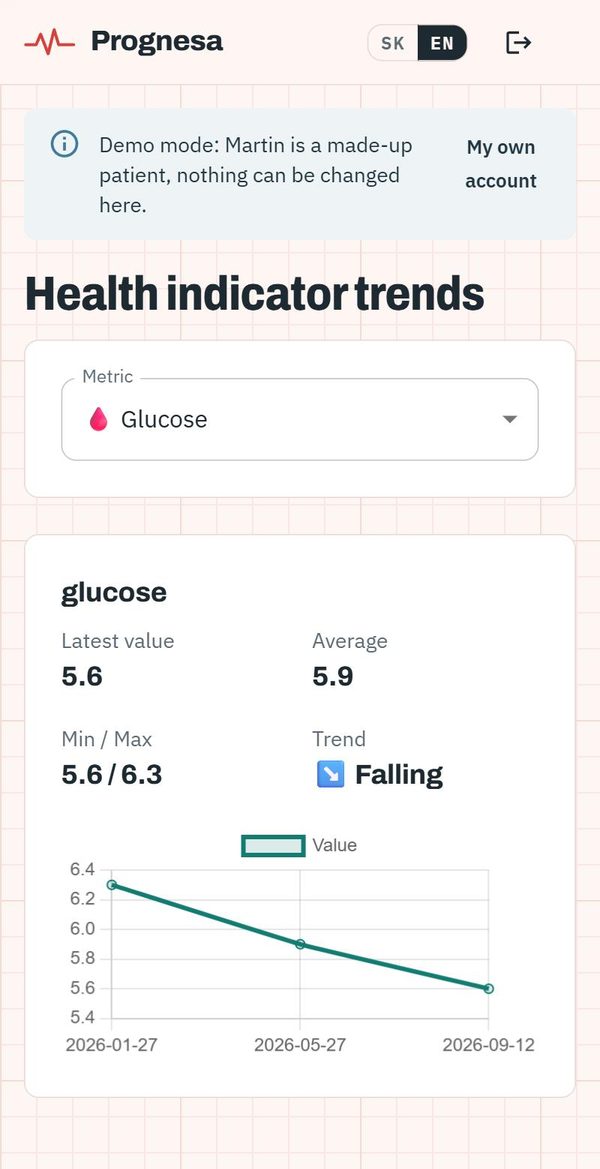
Trends shows the latest value, average, min / max, trend direction and a chart of every result.
Next to food and activity
Glucose sits beside your weight, steps and meals, which you can log from a photo.
Ask about it
Ask the AI assistant questions such as “How has my blood sugar changed since spring?”
Up and running in three steps
Create your free account
An email and a password. Nothing to install.
Add your results
Upload lab reports, import from Apple Health, or type in readings.
Follow the trend
Open Trends and pick glucose to see every result on one chart.
Glucose tracking: common questions
What is the difference between glucose and HbA1c?
A glucose test shows your blood sugar at the moment of the test, often after fasting. HbA1c reflects your average blood sugar over roughly the last two to three months. Both often appear on routine blood tests, and Prognesa can keep both in your history.
Can I upload my old blood tests?
Yes. Upload PDFs or photos (JPG, PNG) of past lab reports, and each result is stored with the date of the test, so the trend reaches back as far as your reports do.
Does Prognesa work with continuous glucose monitors (CGM)?
Not directly. If your meter or CGM app writes readings to Apple Health, they can come in with an Apple Health import. Prognesa is designed to show long-term trends, not to replace your CGM app or alerts.
Can Prognesa tell me if I have diabetes?
No. Prognesa shows your values next to the reference ranges on your reports and how they change over time. Diagnosis and treatment of diabetes belong with your doctor.
Is Prognesa free to use?
Yes, during the beta. Your record, trends and overview have no limit. AI features have a free daily allowance per account: 50 questions to the assistant, 10 lab reports read by AI, 15 meal analyses and 5 in-depth AI analyses.
Supports your doctor visits, doesn't replace them
Prognesa helps you keep your measurements organised and see how they change. It is not a medical device: it does not diagnose, treat or prevent any disease, and AI answers can be wrong. Decisions about your health belong with your doctor. How we protect your data →
Understand your health trends over time.
Start tracking your glucose with Prognesa, next to the rest of your health data.